
The Xbox Series S has quickly become one of the most popular gaming consoles for players who want next-generation performance without the premium price tag. One of the biggest reasons for its popularity is its seamless integration with Xbox Game Pass — a subscription that gives players access to hundreds of games for a monthly fee.
For many gamers, Xbox Game Pass on Xbox Series S is the most affordable way to experience modern gaming. Instead of buying individual titles for $60–$70, players can explore a large library of games across multiple genres. Combined with fast SSD storage, cloud gaming, and day-one releases from Microsoft studios, the service dramatically changes how games are accessed and played.
This complete guide explains how Xbox Game Pass works on Xbox Series S, what features you get, which subscription tier is best, and why the combination has become one of the best values in gaming.
What Is Xbox Game Pass?
Xbox Game Pass is a subscription platform that gives members access to a large library of downloadable and cloud-streamed games. Instead of purchasing games individually, subscribers pay a monthly fee to access hundreds of titles.
The service works similarly to Netflix or Spotify, but for video games. Once subscribed, players can download games directly to their console and play them as long as they remain in the Game Pass library.
Key features include:
- Access to hundreds of console games
- Regular monthly additions and removals
- Discounts on purchasing Game Pass titles
- Day-one releases from Xbox Game Studios
- Online multiplayer support depending on the plan
- Cloud gaming for instant play
For Xbox Series S owners, this subscription dramatically expands the console’s value by providing instant access to a huge gaming library.
Why Xbox Game Pass Works Perfectly on Xbox Series S
The Xbox Series S was designed specifically for digital gaming. Unlike traditional consoles, it does not include a disc drive, meaning games must be downloaded or streamed.
This makes Game Pass the ideal companion.
Instead of buying every game from the digital store, players can download hundreds of titles through their subscription.
Advantages of using Game Pass on Xbox Series S
1. Huge Digital Game Library
Game Pass gives Series S owners access to hundreds of games without needing physical copies.
2. Affordable Gaming
The subscription costs significantly less than buying multiple full-price games each year.
3. Instant Game Discovery
Players can try many different genres without worrying about wasting money on a single title.
4. Cloud Gaming Support
Some games can be streamed instantly without downloading, allowing players to test them before installation.
Because the Series S is fully digital, Game Pass essentially becomes the console’s main source of games.
Xbox Game Pass Plans Available for Series S
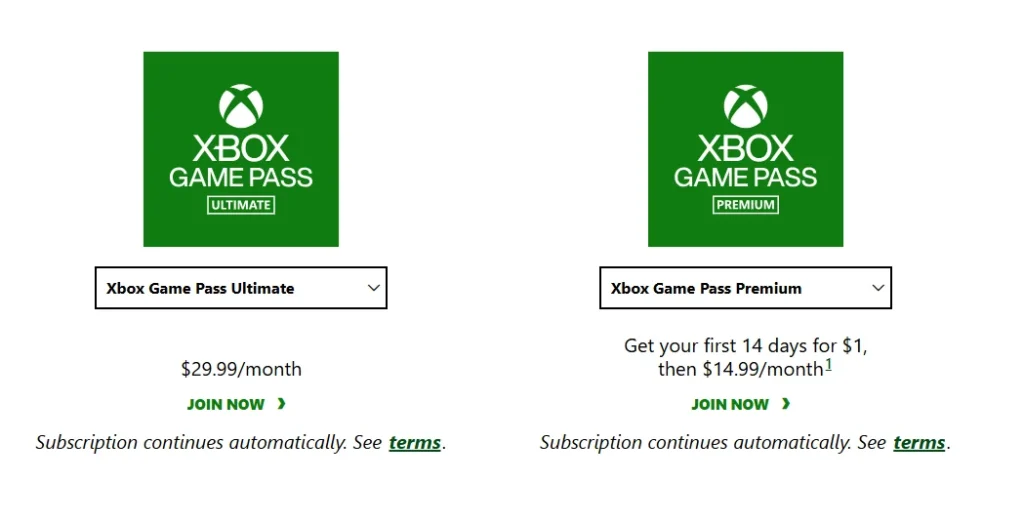
There are several subscription tiers available for Game Pass, each offering different benefits.
1. Game Pass Core
This entry-level tier includes:
- Online multiplayer access
- A smaller curated game library
- Discounts on select games
It replaced the old Xbox Live Gold service.
2. Console Game Pass
This plan focuses on console gaming and includes:
- Access to hundreds of downloadable console games
- New titles added monthly
- Discounts on Game Pass titles
However, it does not include online multiplayer.
3. PC Game Pass
This plan is designed specifically for PC gamers and is not necessary for Series S owners unless they also play on PC.
4. Game Pass Ultimate
Xbox Game Pass Ultimate combines every benefit into one subscription:
- Console Game Pass
- PC Game Pass
- Online multiplayer
- Cloud gaming
- EA Play library
- Exclusive member perks
For most Series S owners, Game Pass Ultimate offers the best experience.
Xbox Game Pass Game Library on Series S
One of the biggest benefits of Game Pass is the size of its library.
Subscribers can access:
- AAA blockbuster titles
- popular indie games
- classic Xbox games
- multiplayer titles
- story-driven RPGs
- sports and racing games
Major franchises available through Game Pass frequently include:
- Halo
- Forza
- Minecraft
- Doom
- Fallout
- Elder Scrolls
Games rotate regularly, meaning new titles are added every month.
Many first-party games from Microsoft studios also launch on Game Pass the same day they release.
This “day-one” availability is one of the biggest reasons the subscription has become so popular.
Cloud Gaming on Xbox Series S
Another major advantage of Game Pass is cloud gaming.
With cloud gaming, players can start playing certain titles instantly without downloading them to the console.
Through Xbox Cloud Gaming players can:
- Play games without installing them
- Try games before downloading
- Save console storage space
- Switch between devices easily
Cloud gaming streams the game from remote servers instead of running it directly on the console.
Players simply need:
- Stable internet connection
- Game Pass Ultimate subscription
- Supported device or console
Cloud gaming can also stream games owned by the player without downloading them.
This feature is particularly useful on Xbox Series S because the console’s storage capacity is smaller than other consoles.
Xbox Series S Performance With Game Pass
Despite being smaller and cheaper than its counterpart, the Xbox Series S still delivers impressive gaming performance.
Key specifications include:
- Custom Zen 2 processor
- RDNA 2 graphics architecture
- 10GB GDDR6 memory
- 512GB or 1TB NVMe SSD
- Up to 1440p resolution
- Up to 120 FPS gameplay
The fast SSD storage significantly improves load times for Game Pass titles.
Games optimized for Series S also benefit from:
- Faster loading
- Improved performance
- Enhanced graphics compared to older Xbox consoles
Storage Considerations for Game Pass
One common concern for Series S owners is storage space.
The base model includes 512GB SSD storage, though some versions offer 1TB.
Because modern games can exceed 100GB, players may need to manage storage carefully.
Ways to manage Game Pass storage
- Delete games you no longer play
- Use external USB storage for older titles
- Install only active games
- Use cloud gaming to test games before downloading
These strategies help Series S owners maximize their Game Pass experience without running out of space.
EA Play Integration With Game Pass
Another advantage of Game Pass Ultimate is the inclusion of EA Play.
EA Play provides access to additional games from Electronic Arts, including titles like:
- Battlefield
- FIFA
- Madden NFL
- Need for Speed
- Star Wars games
Members can download and play many EA titles at no extra cost.
EA Play also provides:
- Early access trials for upcoming games
- Exclusive in-game rewards
- Discounts on EA purchases
This dramatically increases the total number of available games for Xbox Series S players.
Multiplayer Gaming on Xbox Series S With Game Pass
Online multiplayer is one of the most important features for modern gamers.
Game Pass supports multiplayer depending on the subscription tier.
Players need Game Pass Core or Ultimate to play most online games with friends.
Once subscribed, players can enjoy multiplayer titles such as:
- Halo multiplayer
- racing games
- co-op shooters
- battle royale games
- online sports games
The multiplayer ecosystem allows Series S users to connect with millions of players worldwide.
Tips to Get the Most From Game Pass on Series S
To maximize the value of Game Pass on Xbox Series S, players should follow a few simple strategies.
1. Try Games Through Cloud First
Cloud gaming allows you to test titles before downloading.
2. Use Game Pass Discounts
Members receive discounts when purchasing games permanently.
3. Check New Monthly Additions
New games are added frequently, so checking updates ensures you never miss major releases.
4. Explore Different Genres
Game Pass is perfect for discovering indie games and genres you might not normally try.
5. Manage Storage Regularly
Delete games you have finished to free up space for new ones.
Is Xbox Game Pass Worth It for Xbox Series S?
For most players, the answer is yes.
The combination of:
- affordable subscription pricing
- hundreds of games
- day-one releases
- cloud gaming
- EA Play integration
makes Game Pass one of the best gaming services available.
Since the Xbox Series S is a digital-only console, Game Pass essentially acts as the console’s primary game library.
Instead of spending hundreds of dollars on individual titles, players can enjoy a massive rotating catalog through a single subscription.
Final Thoughts
The combination of the Xbox Series S and Xbox Game Pass has fundamentally changed how players access games.
For new Xbox owners, the service instantly unlocks hundreds of titles without needing to buy each game individually.
With features like cloud gaming, online multiplayer, EA Play integration, and day-one game releases, Game Pass turns the Series S into a powerful and affordable gaming platform.
Whether you’re a casual gamer exploring new titles or a dedicated player looking for the best value in gaming, Xbox Game Pass on Xbox Series S offers one of the most compelling experiences in modern gaming.
Frequently Asked Questions (FAQ’s)
1. Does Xbox Series S come with Xbox Game Pass?
No, the Xbox Series S does not automatically include Xbox Game Pass. However, many retailers sell bundles that include a few months of Game Pass. Players can also subscribe separately through the console or Microsoft account.
2. Can you play all Xbox Game Pass games on Xbox Series S?
Most games available through Xbox Game Pass are compatible with the Xbox Series S. Some titles are optimized specifically for the Series S hardware, providing improved performance, faster loading times, and better graphics.
3. How much does Xbox Game Pass cost for Xbox Series S?
The cost of Xbox Game Pass depends on the plan you choose. Basic plans start around $10 per month, while Xbox Game Pass Ultimate costs more but includes cloud gaming, online multiplayer, PC Game Pass, and EA Play.
4. Do you need Game Pass to play online on Xbox Series S?
Yes, most multiplayer games require either Xbox Game Pass Core or Xbox Game Pass Ultimate to access online multiplayer features.
5. Can you use Xbox Cloud Gaming on Xbox Series S?
Yes, Xbox Cloud Gaming is available on the Xbox Series S if you have an active Xbox Game Pass Ultimate subscription. This allows players to stream games directly without downloading them